

How to Choose Smart Glasses for People Who Work on Computers All Day?
SpeCiC-AI-Smart-Glasses2026-04-20T14:26:11+08:00How to Choose Smart Glasses for People Who Work on Computers All Day?
If you’re reading this, you’ve got a love-hate relationship with your computer. You love that it pays the bills, lets you create, and crush your to-do list—but you hate the sandpaper-dry eyes by 3 PM, the crick in your neck from hunching over a tiny laptop screen, the endless tab-juggling between spreadsheets and Slack, and the constant paranoia that your cubicle neighbor is reading your confidential messages over your shoulder.
If you’ve dropped $50 on blue light glasses that only turn your screen yellow without fixing the real problems, you’re not alone. For years, we’ve been told the only fixes are “take more breaks” or “buy a bigger monitor.” But what if you work from coffee shops, travel for work, or just hate being chained to a static desk? That’s where smart glasses come in.
Forget clunky sci-fi headsets or gimmicky gadgets that die after two hours. We’re talking about sleek, everyday smart glasses for computer work that solve the actual pain points of 8+ hour computer workdays. But before we dive into brands and features, let’s tackle a question splitting the remote work community right down the middle.
Here’s the debate: One camp swears that pinning 3-5 virtual screens in space is just as good (or better) than a physical dual-monitor setup—no desk clutter, full portability. The other camp argues that nothing beats the tactile, fixed feel of real monitors, and that virtual screens break your focus when you turn your head. Is the “portable multi-monitor” promise a game-changer, or just a shiny distraction?
Why Your Regular Blue Light Glasses Aren’t Cutting It Anymore
Standard blue light glasses are the participation trophy of screen accessories. They’re better than nothing, but they don’t fix the four core issues making all-day computer work miserable:
- The screen real estate prison: A single laptop screen forces endless tab-switching, killing your focus. A second monitor only works if you’re glued to one desk. Blue light glasses don’t give you more space—they just make your tiny screen look slightly less harsh.
- Posture and eye strain nightmare: Staring at a below-eye-level screen for hours gives you “text neck” and forces your eye muscles to stay contracted all day (like holding a bicep curl for 8 hours). Blue light glasses don’t fix your hunch or give your eyes a more natural focal distance.
- Meeting chaos: Juggling note-taking, presentations, Slack messages, and camera eye contact in Zoom calls is a juggling act that always ends with missed details. Basic glasses can’t transcribe meetings or show you notes discreetly.
- Shoulder surfing paranoia: Working in open offices or coffee shops means your screen is always on display. Privacy filters wash out your view, and regular glasses do nothing to keep your work private.
Smart glasses solve every single one of these problems—but not all pairs are created equal. Before we get to the brands, let’s talk about the only features that actually matter for your 9-to-5 grind.
Non-Negotiable Features for All-Day Computer Work Smart Glasses
Every brand will bombard you with buzzwords like “4K AR” and “AI superpowers,” but these are the only features that will actually make your workday easier:
1. All-Day Comfort: If It Hurts to Wear, You Won’t Wear It
This is non-negotiable. Even the fanciest smart glasses are useless if they leave red marks on your nose or give you a headache after 4 hours. Look for:
- Frames 50 grams or less (most regular prescription glasses are 20-30g)
- Fully adjustable nose pads (not fixed, one-size-fits-none)
- Prescription lens support (magnetic inserts are a plus—no tools needed)
- Lightweight, durable materials like TR-90 plastic or titanium
2. Work-Optimized Display: Skip the Gimmicks, Focus on Text Clarity
You’re not buying these to watch movies—you’re buying them to read spreadsheets, write code, and draft emails. The display needs to be:
- Dual 1080p per eye resolution (sharp enough for small text; 4K is overkill and drains battery)
- 60Hz+ refresh rate (120Hz is ideal for smooth scrolling)
- Auto-brightness adjustment (adapts to dim bedrooms and bright coffee shops)
- Spatial locking (pins virtual screens in place like physical monitors—*not* glued to your face)
3. Battery Life That Outlasts Your Workday
Ignore the “up to 24 hours” marketing—that’s standby time. You need at least 8 hours of continuous use with the display active, plus fast charging (15 minutes = 2+ hours of use) for those “oops, forgot to charge” mornings.
4. Seamless Compatibility With Your Existing Work Setup
Native support for Windows and macOS is a must. USB-C plug-and-play is ideal (no adapters to lose), plus seamless multi-device switching between your laptop and phone, and full integration with Zoom, Teams, Slack, and Google/Microsoft 365.
5. Hands-Free & Voice Control
The best hands-free smart glasses let you answer calls, start recordings, and activate your AI assistant without touching your phone or laptop—critical for staying in your flow state during deep work or meetings.
6. Language & Accessibility Tools
For global teams and cross-border business, real time translation smart glasses break down language barriers instantly, with live translation for meetings, calls, and in-person conversations—no phone or extra app required.
Here’s the big workplace debate: One side says discreet smart glasses are just a productivity tool, no different from a wireless headset. The other side argues that wearing glasses with a camera/mic in meetings makes people uncomfortable, and that having a virtual screen in front of your eyes makes you look disengaged from your team. Is it okay to wear smart glasses in a client meeting? Do they cross a line between “productive” and “rude”?
Top Smart Glasses Brands for Computer Workers: Solutions for Every Work Style
We’ve narrowed down the market to brands that actually cater to all-day computer users, not just gamers or content creators. Let’s break them down.
1. SpeCiC AI Smart Glasses: The All-Day Workhorse Built for Screen Warriors
Unlike most brands that tack on productivity features as an afterthought, SpeCiC designed its AI powered smart glasses from the ground up for people who live in front of a screen. Every feature solves a specific workday pain point, with zero gimmicks.
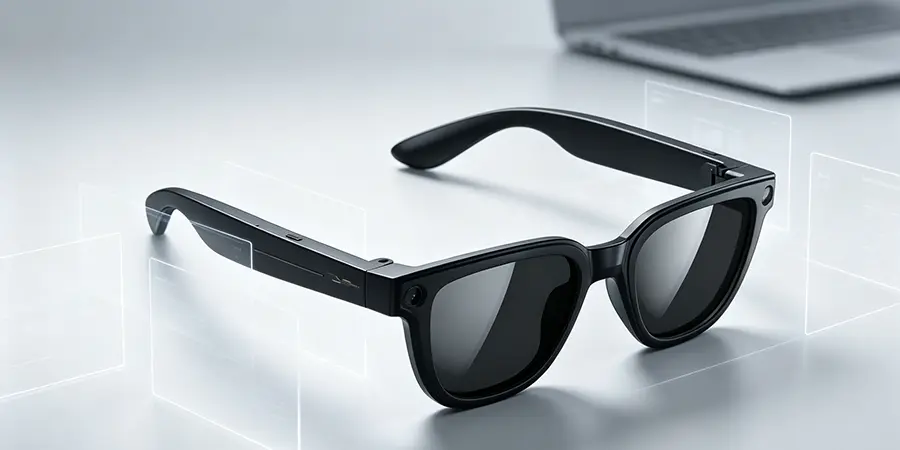
Core work solutions: Weighing just 39 grams (lighter than most prescription glasses), with a flexible TR-90 build, fully adjustable premium silicone nose pads, and easy magnetic prescription inserts. Dual 1080p Micro-OLED 120Hz displays are fine-tuned for text clarity, with best-in-class 3DoF spatial locking for up to 3 virtual screens. 10 full hours of display battery life, 15-minute fast charging, and a charging case adding 30 extra hours. Native plug-and-play support for all major OS, plus rock-solid Bluetooth 5.3, full work app integration, directional sound with zero leakage, physical privacy switches, local data processing, and a classic rectangular frame that looks exactly like premium regular eyewear.
It also includes an 8MP Sony-grade camera for sharp photo and 1080P video capture, dual ENC noise-reduction microphones for crystal-clear calls, and support for 27 languages of real-time translation powered by leading large language models. Multiple lens options are available, from sun-safe polarized lenses to clear blue light-blocking options for all-day screen use.
- Built *exclusively* for all-day computer work
- Best-in-class comfort and privacy
- 10+ hour display battery life
- Seamless work app integration
- Professional, discreet design
- Mid-premium price point
- No gaming-specific features
- Limited frame color options
Best for: Anyone working 8+ hours a day on a computer—remote workers, coders, writers, analysts, project managers, and client-facing professionals.
2. Ray-Ban Meta Gen 2: The Stylish Hybrid Worker Sidekick
For hybrid workers who split time between the office, client meetings, and on-the-go work, and prioritize style as much as functionality, the Ray-Ban Meta Gen 2 is a solid choice. It pairs iconic Ray-Ban design with Meta’s AI assistant, for a pair that works for both work and everyday life.
Core work solutions: Timeless, fully discreet Wayfarer/Aviator frames with 150+ lens/frame combinations, a powerful multimodal Meta AI assistant for hands-free tasks, solid 5-mic noise cancellation for calls, and 6 hours of continuous audio/AI use.
- Iconic, fully discreet design
- Powerful multimodal AI
- Solid call quality
- Hundreds of customization options
- No AR display (can’t be used as a virtual monitor)
- Shorter battery life
- Meta privacy concerns for confidential work
Best for: Hybrid workers who spend most of their day in meetings, don’t need a virtual multi-monitor setup, and want stylish, versatile glasses.
3. Xreal One Pro: The Virtual Multi-Monitor King for Power Users
For power users like coders, data analysts, and video editors who need massive screen space above all else, the Xreal One Pro is the gold standard for virtual displays.
Core work solutions: Dual 1080p Micro-OLED 120Hz displays with a 171-inch virtual screen, industry-leading 3DoF spatial tracking for up to 5 virtual screens, premium Bose speakers, and plug-and-play compatibility with almost any USB-C device.
- Massive 171-inch virtual screen
- Industry-leading spatial tracking
- Premium Bose audio
- Wide device compatibility
- Heavy 79g frame (uncomfortable for all-day wear)
- Requires wired USB-C connection
- No built-in display battery
- Limited AI productivity features
Best for: Fixed-desk power users who prioritize display size and quality over all-day portability.
Here’s the final debate: One camp says real-time meeting transcription, hands-free voice commands, and AI summarization cut down on busywork and let you focus on deep work. The other camp argues that having AI feed you information all day is just another form of distraction—pulling you out of your flow state and making you reliant on a tool to do basic tasks. Is AI in smart glasses a productivity superpower, or just another notification to ignore?
Choosing the right pair comes down to your number one work priority:
- If you need an all-day, all-in-one solution for 8+ hours of computer work: Go with SpeCiC AI Smart Glasses.
- If you prioritize style and meeting-focused features over a virtual monitor: Go with Ray-Ban Meta Gen 2.
- If you’re a fixed-desk power user needing maximum screen space: Go with Xreal One Pro.
- If you’re on a tight budget and only need audio/voice features: Go with Amazon Echo Frames.
Final Thoughts
At the end of the day, the best smart glasses for your workday are the ones you’ll actually wear every single day. They should solve your real work pain points, not just add flashy gimmicks, and fit seamlessly into your workflow without drawing attention or causing discomfort.
You don’t have to be stuck with a tiny laptop screen, a sore neck, and sandpaper-dry eyes every single workday. The right pair of smart glasses turns any space into your perfect office—whether you’re at your desk, in a coffee shop, or on the road—so you can get your work done faster, more comfortably, and with a lot less frustration.
Now it’s your turn: Which side of our controversies are you on? Have you tried smart glasses for work, and did they live up to the hype? Drop your thoughts below—we’d love to hear from you.