

How to Clean Smart Glasses Properly Without Damaging the Sensors
SpeCiC-AI-Smart-Glasses2026-04-12T17:18:15+08:00How to Clean Smart Glasses Properly Without Damaging the Sensors
Let me tell you a story that every smart glasses owner will relate to.
Last month, I was at a friend’s birthday party, having the time of my life. The music was loud, the food was amazing, and I was wearing my brand-new SpeCiC AI glasses, feeling like the coolest person in the room.
I was taking hands-free photos left and right. I was using the voice assistant to settle arguments about movie release dates. I was even controlling my music without touching my phone.
Then disaster struck.
I leaned in for a bite of chocolate cake, and — splat — a huge glob of frosting landed directly on the front of my glasses. Right over the camera lens.
Is it possible that 90% of smart glasses damage is caused by bad cleaning habits, not normal wear and tear? And are brands intentionally not teaching us how to clean them properly?
Panic ensued.
I grabbed the nearest napkin (which, of course, was a cheap paper napkin) and started scrubbing furiously. I breathed on the lens to fog it up, then scrubbed some more. I used my shirt. I used a wet wipe from the bar. I even considered using my tongue.
By the time I was done, the frosting was gone.
But so was the camera’s ability to take clear photos.
Everything was blurry and smudged. My $239 smart glasses were now just a fancy pair of regular glasses. And it was all because I didn’t know how to clean them properly.
Sound familiar? If you own smart glasses, I’d bet good money you’ve been there.
We spend hundreds of dollars on these amazing devices, but we clean them like they’re a cheap pair of sunglasses from the gas station. We use our shirts, paper towels, window cleaner, and even spit — all things that can destroy the sensitive sensors and coatings.
In this guide, I’m going to teach you everything you need to know. I’ll show you exactly what to do, what to avoid at all costs, and how to keep your SpeCiC glasses looking and working like new for years.
I’ve made all the mistakes so you don’t have to.
Why Smart Glasses Are Nothing Like Regular Glasses
Before we talk about how to clean your glasses, let’s talk about why you can’t just clean them like regular glasses.
A regular pair of glasses is simple. It’s two pieces of glass or plastic in a frame. You can clean them with pretty much anything, and they’ll be fine. I’ve cleaned my regular glasses with my shirt, paper towels, and even window cleaner, and they’re still going strong after 5 years.
Smart glasses are different. Very different.
They’re not just glasses. They’re tiny computers that you wear on your face. They’re packed with sensitive electronics, cameras, microphones, touchpads, and batteries. And all of these things can be destroyed by water, chemicals, or even just too much pressure.
Smart glasses are intentionally designed to be fragile. Brands make them delicate so you’ll have to replace them every 2-3 years. It’s not a bug — it’s a business model.
The 6 Most Fragile Parts of Your SpeCiC Glasses
Let’s take a look at all the parts you could accidentally destroy with one wrong wipe:
Now that you know what you’re dealing with, let’s talk about what happens when you get it wrong.
The Real Cost of Bad Cleaning Habits
You might be thinking, “It’s just a little water. What’s the worst that can happen?”
Well, let me tell you. I’ve seen people ruin their smart glasses in all kinds of creative ways:
- A friend sprayed Windex directly on her Ray-Ban Meta glasses and stripped the anti-reflective coating. Now everything has a weird rainbow glare.
- Another friend submerged his XREAL Air 2 glasses in water to clean them. They never turned on again.
- I’ve heard stories of people using toothpaste to “fix” scratches, only to make them 10 times worse.
- And yes — people actually put their smart glasses in the dishwasher. I wish I was making that up.
Should smart glasses come with a “cleaning mistake warranty”? If we’re paying $200-$500 for these devices, shouldn’t they be able to survive a little water or a wrong wipe?
The worst part? Almost none of this damage is covered by warranty.
If you damage your glasses by cleaning them improperly, you’re out of luck. You’ll have to buy a whole new pair.
That’s why learning how to clean them properly is so important. A little bit of knowledge can save you hundreds of dollars.
The 7 Deadly Sins of Smart Glasses Cleaning
Before we talk about what you should do, let’s talk about what you absolutely should NOT do.
These are the seven most common cleaning mistakes that will ruin your smart glasses. I’ve committed every single one of them, so I speak from experience.
Half of these “rules” are complete nonsense. The cleaning industry has been lying to us for decades to sell more products. Some of these “deadly sins” are actually perfectly safe.
Sin #1: Using Your Shirt or Any Piece of Clothing
This is the most common mistake, and it’s also one of the most damaging.
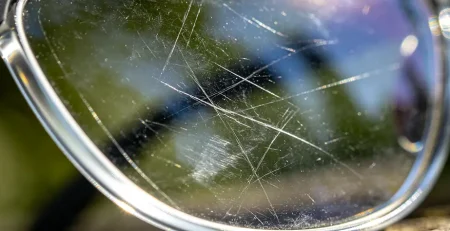
Your shirt might look clean, but it’s covered in tiny dust particles, dirt, and fibers. When you rub your shirt against your lenses, you’re basically grinding those particles into the surface, causing micro-scratches.
And if you’re wearing a cotton shirt? Even worse. Cotton is extremely abrasive and can scratch even the hardest lens coatings.
I learned this the hard way with my first pair of SpeCiC glasses. I used my favorite cotton t-shirt to clean them every day, and within a month, the lenses were covered in tiny scratches.
Sin #2: Using Paper Towels, Tissues, or Toilet Paper
Paper products are even worse than clothing.
They’re made from wood pulp, which is basically just soft sandpaper. A single wipe with a paper towel can leave dozens of tiny scratches on your lenses.
And don’t even think about using toilet paper. It’s the worst of the worst.
Sin #3: Using Harsh Chemicals
Window cleaner, bleach, ammonia, vinegar, and rubbing alcohol — all of these are terrible for your smart glasses.
They can strip away the lens coatings, damage the plastic frame, and even corrode the internal electronics.
I know what you’re thinking: “But rubbing alcohol kills germs!” Yes, it does. But it also kills your smart glasses.
Sin #4: Spraying Cleaner Directly on the Glasses
Even if you’re using a cleaner that’s safe for glasses, you should never spray it directly on your smart glasses.
The liquid can seep into the charging port, microphone holes, or other openings and damage the internal electronics.
Always spray the cleaner onto a cloth first, then use the cloth to clean your glasses.
Sin #5: Scrubbing Too Hard
When you have a stubborn smudge, it’s tempting to scrub hard to get rid of it.
Don’t do this.
Too much pressure can scratch the lenses, damage the camera, or even crack the frame.
Use a light touch. Let the cleaner and the microfiber cloth do the work.
Sin #6: Using Compressed Air Too Close
Compressed air can be a great way to remove dust from the microphone holes and charging port.
But if you hold the can too close to the glasses, the force of the air can damage the delicate components.
Always hold the can at least 6 inches away from the glasses. And never tilt the can or turn it upside down.
Sin #7: Forgetting to Clean the Case
This is the most overlooked mistake, and it’s also one of the most important.
You might clean your glasses every day, but if your case is dirty, you’re just putting clean glasses into a dirty environment.
All the dust, dirt, and oil in the case will transfer back to your glasses the second you put them away.
Is the case actually dirtier than the glasses themselves? We spend so much time cleaning the glasses, but maybe we’re cleaning the wrong thing.
The Only 6 Tools You Actually Need
Now that you know what not to do, let’s talk about what you should do.
First, you need the right tools. The good news is that you don’t need any fancy or expensive tools. You probably already have most of these things at home.
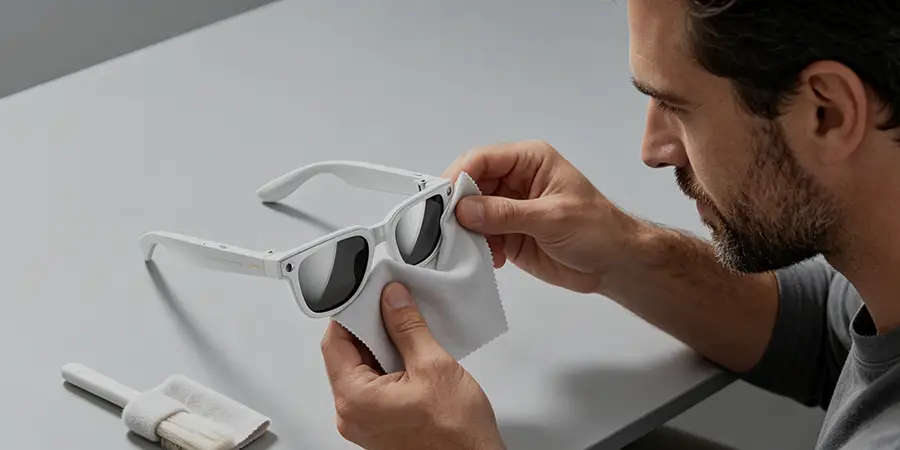
The most important tool. The SpeCiC comes with a great one, but have a few extras. Wash them regularly.
Look for a formula that’s safe for coated lenses. Avoid anything with ammonia or alcohol.
A small makeup brush or camera lens brush works perfectly for dust in crevices.
For cleaning around the charging port and microphone holes. Never insert them into the holes.
Perfect for removing dust and light smudges. Tap water can leave mineral spots.
For heavy grease and stubborn smudges. Use only fragrance-free, clear soap.
You don’t need any of these “special” tools. A clean 100% cotton t-shirt and tap water work just as well — if you know what you’re doing. The cleaning industry is just scamming you.
That’s it! You don’t need any fancy lens pens, ultrasonic cleaners, or expensive cleaning kits.
With these six simple items, you can keep your SpeCiC glasses clean and working like new for years.
The 30-Second Daily Cleaning Routine
This is the routine you should follow every single day. It only takes 30 seconds, and it will prevent 90% of the problems that come with dirty glasses.
Ready? Let’s get started.
Is daily cleaning actually necessary? Or are we over-cleaning our glasses and wearing down the coatings faster than normal wear and tear would?
That’s it! Your SpeCiC glasses are now clean and ready to use.
Do this every day, and you’ll avoid most of the problems that come with dirty glasses.
The Weekly Deep Cleaning Routine
Sometimes, daily cleaning isn’t enough.
If your glasses are covered in grease, makeup, or sweat, you’ll need to do a deep clean. You should do this about once a week, or whenever your glasses get really dirty.
Let’s roll up our sleeves and get to work.
How to Clean Every Type of Stain
Not all stains are created equal. Different types of stains require different cleaning methods.
Here’s how to clean the most common types of stains from your SpeCiC glasses:
All these “specialized” stain cleaning methods are complete nonsense. Warm water and a microfiber cloth can handle 99% of stains. The rest is just marketing hype.
Grease and Oil
The most common type of stain. For light grease, the daily routine works fine. For heavy grease, use the deep cleaning method with mild dish soap.
Makeup
Brush off powder first. For liquid makeup or mascara, use a cotton swab dipped in a tiny amount of oil-free makeup remover.
Sweat and Odor
Wipe the nose pads and temples with a mixture of equal parts water and white vinegar. Rinse thoroughly and dry.
Dust and Sand
Never wipe dry sand or dust. Always rinse first to remove all particles, then clean normally.
Fingerprints
A quick wipe with a dry microfiber cloth is usually all you need.
How to Clean Less by Protecting Your Glasses
The best way to keep your glasses clean is to prevent them from getting dirty in the first place.
Here are some simple tips that will reduce how often you need to clean your SpeCiC glasses:
When you’re not wearing your glasses, put them in the hard-shell case. This is the single most important thing you can do.
Never touch the lenses or camera with your fingers. Always hold your glasses by the frame.
Don’t wear your glasses at the beach, construction sites, or places with a lot of dust or smoke.
Extreme heat can warp the frame and damage the lens coatings.
Clean your case at least once a month. A dirty case will make your glasses dirty.
The cleaner your hands are, the less dirt will transfer to your glasses.
Are we being too precious with our smart glasses? Maybe they’re more durable than brands lead us to believe, and all this “protection” is just making us paranoid.
The Most Common Cleaning Questions Answered
I get asked these questions all the time. Here are the answers:
Q: Can I use alcohol wipes to clean my SpeCiC glasses?
A: No. Alcohol wipes contain harsh chemicals that can strip away the lens coatings and damage the plastic frame.
Q: Can I submerge my SpeCiC glasses in water?
A: No. SpeCiC glasses are not waterproof. Submerging them will damage the internal electronics.
Q: What should I do if water gets in the charging port?
A: Turn off the glasses immediately. Dry the port with a dry cotton swab and air dry for 24 hours before charging.
Q: How do I fix a scratched camera lens?
A: Scratches are usually permanent. Contact SpeCiC support for repair options.
Q: How often should I replace my microfiber cloth?
A: Every 3-6 months, or when it starts to look dirty or worn out.