

Why Do Smart Glasses Make a Buzzing Sound When Charging?
SpeCiC-AI-Smart-Glasses2026-04-26T19:01:38+08:00Why Do Smart Glasses Make a Buzzing Sound When Charging?
Let me set the scene for you. You've just had an amazing day with your brand-new smart glasses. You navigated the city without looking at your phone, captured some incredible photos hands-free, and even had your AI assistant translate that tricky menu at the new restaurant downtown. Life feels futuristic, like you're living in that sci-fi movie you loved as a kid.
Then, as you settle in for the evening, you place your glasses in their charging case, ready for another day of tech-enhanced adventures. You close the lid, turn off the lights, and... *bzzzzzzzz*.
What is that sound? Is your glasses case trying to communicate with aliens? Did you accidentally buy a beehive instead of a charging case? Is this the beginning of the robot apocalypse?
Relax. You're not going crazy, and your smart glasses aren't plotting to take over the world (probably). That buzzing sound you're hearing is actually a surprisingly common issue with smart glasses of all brands, from the budget-friendly options to the premium flagship models.
In this comprehensive guide, we're going to answer the burning question: why do smart glasses buzz when charging. We'll explore the science behind the sound, which brands are most affected, and most importantly, how to make that annoying buzz go away so you can get a good night's sleep.
The Science Behind the Buzz: What's Actually Happening?
Before we start panicking about defective hardware or expensive repairs, let's take a moment to understand the science behind that buzzing sound. It turns out, most of the time, it's not a sign that your glasses are about to explode. It's just physics doing its thing.
Coil Whine: The Most Common Culprit
The number one cause of buzzing sounds in charging electronics is something called "coil whine." If you've ever owned a gaming laptop, a high-end graphics card, or even a phone charger, you've probably experienced this phenomenon before.
Here's how it works: Inside every charging case and power adapter, there are tiny electromagnetic coils. These coils are responsible for converting the alternating current (AC) from your wall outlet into the direct current (DC) that your smart glasses need to charge.
When electricity flows through these coils, they create a magnetic field. This magnetic field causes the coils to vibrate at very high frequencies. Most of the time, these vibrations are too high-pitched for the human ear to hear. But sometimes, for various reasons, the frequency drops into the audible range, and that's when you hear that distinctive buzzing or whining sound.
Think of it like a guitar string. When you pluck a guitar string, it vibrates and creates sound. The tighter the string, the higher the pitch. Similarly, the amount of electricity flowing through the coil affects how fast it vibrates and what pitch it produces.
Coil whine is particularly common in devices that use fast charging technology, like most modern smart glasses. The higher the power output, the more electricity flows through the coils, and the more likely they are to vibrate at an audible frequency.
Other Causes: EMI, Poor Connections, and Firmware
Coil whine isn't the only culprit. Electromagnetic interference (EMI) happens when the charging system's magnetic field messes with your glasses' speakers or microphones—like holding a phone too close to a speaker and hearing static.
Poor electrical connections (dirty charging pins, loose cables) can cause arcing, while firmware glitches might make the charging system pulse on and off. Both are common sources of smart glasses charging noise.
Hot Take: Is Buzzing a Design Choice, Not a Flaw?
Here's a question to spark debate: Should brands prioritize *silent charging* over *fast charging*? Or is a faint buzz a reasonable trade-off for getting 50% battery in 20 minutes?
Some people say buzzing is a sign of cheap components—but others argue it's inevitable when you pack high-power circuits into a frame light enough to wear on your face. Where do you stand?
Now that we've unpacked the science, let's see how this plays out in real-world devices—starting with a brand that's been turning heads in the AI glasses space: SpeCiC.
Brand Spotlight: How Different Smart Glasses Handle Charging Noises
SpeCiC Smart Glasses: Sleek Design, Minor Buzzing Quirks
SpeCiC has quickly become a favorite among enthusiasts of AI powered glasses thanks to their lightweight design, impressive battery life, and seamless AI integration. But like all smart glasses, they're not immune to the occasional charging buzz.
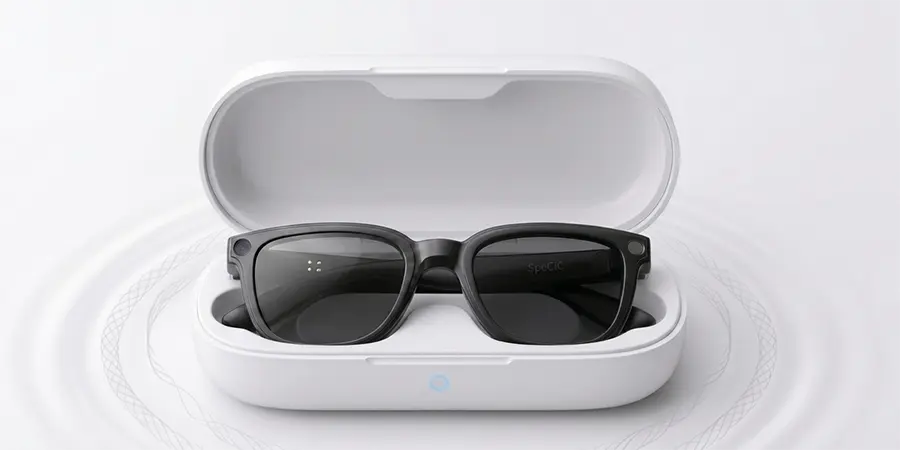
SpeCiC uses a proprietary magnetic charging case that charges the glasses through contacts on the nose bridge. The case itself charges via USB-C and supports fast charging, giving you 50% battery in just 20 minutes.
Most SpeCiC users report that the buzzing sound, when it occurs, is relatively quiet and only noticeable in a completely silent room. It's most common when the glasses are completely dead and you first place them in the case, or when the case is charging at the same time as the glasses.
Why SpeCiC Glasses Buzz When Charging
The main reason SpeCiC glasses buzz during charging is coil whine in the charging case. The case uses a high-efficiency charging circuit with small coils, which are more prone to audible vibrations under certain load conditions.
Another factor is the close proximity of the charging contacts to the speakers in the SpeCiC glasses. The electromagnetic field from the charging system can sometimes interfere with the speaker coils, causing a faint buzzing sound.
SpeCiC-Specific Solutions
- Use the Original Charger: This might sound obvious, but using a non-certified charger is the number one cause of excessive coil whine in SpeCiC cases. The original SpeCiC 15W USB-C charger is specifically designed to minimize noise.
- Charge the Case First: Many SpeCiC users have found that charging the case completely before putting the glasses in it significantly reduces buzzing. When both the case and glasses are charging at the same time, the power draw is higher.
- Clean the Charging Contacts: Over time, dust, oil, and debris can build up on the charging contacts. Use a soft, dry cotton swab to gently clean them—avoid liquids.
- Update Your Firmware: SpeCiC regularly releases firmware updates that can improve charging efficiency. Open the SpeCiC app, go to Settings > Device Information, and check for updates.
- Reset the Charging Case: If all else fails, plug the case in, hold the back button for 15 seconds until the LED flashes red and white, then release.
Apple Vision Pro: Premium Price, Premium Buzzing Issues
The Apple Vision Pro doesn't use a charging case—instead, it has an external battery pack. Many users report high-pitched buzzing from the pack while charging, especially when using the glasses and charging at the same time.
The fix? Use Apple's 30W USB-C charger, charge the pack separately, and keep it away from your head. Apple says faint buzzing is "normal," but you can contact support if it's excessive.
Meta Ray-Ban Smart Glasses: Popular Choice, Common Buzzing Complaints
Meta Ray-Ban glasses are the most popular on the market—and the most common for buzzing. First-gen models are worse, but second-gen still have issues. The fixes? Remove the protective plastic tab from the case, align the glasses properly, and clean the contacts.
XREAL AR Glasses: Display-Focused, Unique Charging Challenges
XREAL glasses charge directly via USB-C and support pass-through charging. Many users report faint buzzing when using the glasses while charging, caused by interference between the charging circuit and display driver.
The best fix is to avoid using the glasses while charging, or use the original XREAL 45W charger for more stable power delivery.
Another Debate: Should We Just Accept Buzzing?
Here's a wild idea: Maybe we're overreacting. Is a faint hum a small price to pay for hands-free AI, photos, and navigation? Or should brands hold themselves to a "silent by default" standard, even if it means slower charging?
Some people say buzzing is "part of the tech charm"—others say it's a sign brands are cutting corners. What's your take?
Brand-specific fixes are great, but what if you have a less common pair of smart glasses? Let's cover universal fixes that work for *any* device.
Universal Solutions: Fixes That Work for Any Smart Glasses
- Use the Original Charger and Cable: This is non-negotiable. Non-certified chargers cause power fluctuations that make buzzing worse.
- Charge in a Cool, Dry Place: Heat makes coil whine louder. Avoid charging in direct sunlight or near heaters.
- Clean Everything Regularly: Dust and oil cause poor connections. Use a dry cotton swab for contacts, compressed air for USB-C ports.
- Update Firmware: Brands release fixes all the time—check your app monthly.
- Try a Different Outlet: Old or overloaded outlets produce "dirty" power. Switch rooms to test.
- Use a Sound-Absorbing Surface: Put the case on a towel or mouse pad to muffle vibrations.
Preventing Future Buzzing: Long-Term Tips
- Handle your glasses and case with care—drops damage internal coils.
- Avoid moisture—sweat or water causes corrosion on contacts.
- Don't use damaged cables—fraying causes power fluctuations.
- Charge regularly—don't let the battery die completely (it makes the charging system work harder).
The Future of Smart Glasses Charging: Will Buzzing Ever Go Away?
Good news: Manufacturers are working on fixes. Gallium nitride (GaN) chargers are smaller, more efficient, and produce less coil whine (their frequencies are above human hearing). Wireless charging is improving too, though it's still less efficient than wired.
That said, buzzing will probably never be *completely* gone—as long as we use electromagnetic coils, there will be vibrations. But it'll get quieter, to the point where you'll barely notice it.
Conclusion: Don't Let the Buzz Ruin Your Fun
At the end of the day, a little buzzing is a small price to pay for the magic of smart glasses. Most of the time, it's just physics—not a sign your device is broken.
Try the fixes in this guide, and if all else fails, just move the case to another room. Your glasses will be fully charged in the morning, ready for another day of adventures.
Now if you'll excuse me, I need to go move my SpeCiC case to the living room. It's been buzzing for 10 minutes, and I think it's trying to tell me something. Probably just time for a firmware update.