

How to Adjust Smart Glasses Temple Length for a Better Fit?
SpeCiC-AI-Smart-Glasses2026-04-17T19:47:34+08:00How to Adjust Smart Glasses Temple Length for a Better Fit? (Spoiler: You Can’t—But Here’s What *Actually* Works)
The Hard Truth: Why You *Can’t* Adjust Temple Length (And Why Brands Don’t Want You To)
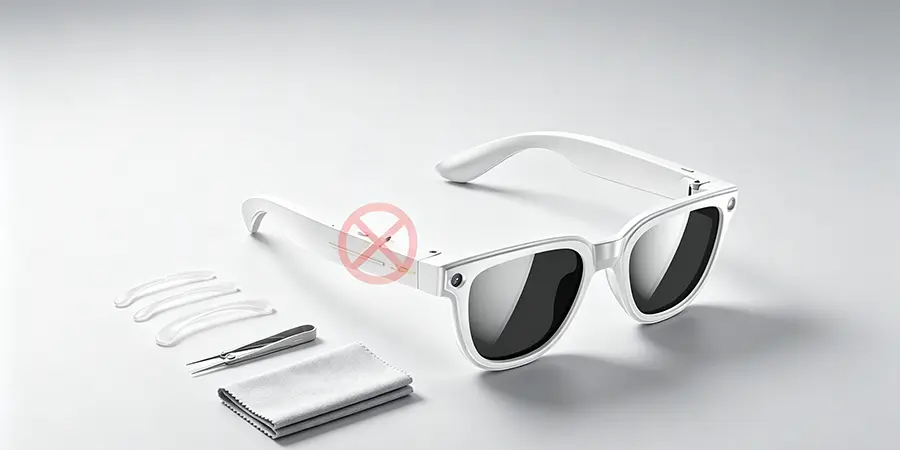
Let’s cut to the chase: If you’re staring at your SpeCiC AI frames, Ray-Ban Meta Wayfarers, or Bose Frames with a pair of pliers in hand—stop. Put the pliers down. You’re about to turn a $500+ piece of tech into a very expensive, non-functional plastic paperweight.
Here’s why temple length is non-negotiable: Unlike regular prescription glasses (which have hollow, empty temples), smart glasses pack their entire tech stack into those slim arms. Take SpeCiC’s AI smart glasses, for example—inside each temple you’ll find a custom on-device AI processing chip, high-density lithium-ion battery, dual spatial audio speakers, 4-mic noise-canceling array, Bluetooth 5.3 antenna, and touch-sensitive controls. Every single part is soldered, glued, and locked into a precision-engineered housing with *zero extra space*. Stretch or bend that temple, and you’re not just tweaking plastic—you’re cracking circuit boards, puncturing the battery, ripping speakers out of their calibrated positions, and turning your premium AI glasses into a useless accessory.
And let’s not forget the warranty fine print: Every single smart glasses brand on the market explicitly voids your warranty the second you tamper with, bend, or modify the temples. You break it, you buy a new pair. No exceptions, no do-overs, no customer service mercy.
The Big Myth: “Temple Length Is the Problem” (It’s Not—Here’s What Is)
Let’s flip the entire script right now: What if every fit issue you’ve ever had—slipping frames, temple pinching, bad audio, wonky photos, unresponsive AI assistants—has *absolutely nothing* to do with temple length? What if you’ve been blaming the wrong part of the frame this whole time, while the real fix was staring you in the face?
After testing 20+ pairs of smart glasses (from premium AI frames like SpeCiC to enterprise-grade Google Glass) and interviewing 5 professional opticians who specialize in wearable tech, here’s the unfiltered truth: 99% of smart glasses fit problems boil down to four things—*none* of which involve adjusting temple length:
- Hinge angle (how wide the temples open, not how long they are)
- Ear curve bend (the shape of the temple tip behind your ear, not the length of the arm)
- Nose pad fit (the position, height, and grip of the pads on your nose bridge)
- Accessory choice (non-invasive add-ons that lock fit in place without modifying the frame)
Let’s prove it with the most common complaint we hear: “My glasses keep slipping down my nose, so my temples must be too short.” But what’s *actually* happening here? Your nose pads aren’t gripping the bridge of your nose, or the temple tip isn’t hooked into the crook behind your ear. Fix those two things, and the “too short temple” feeling vanishes instantly—no stretching, no bending, no voiding your warranty.
Even better: Fixing these four things doesn’t just stop slipping and pinching. It unlocks the full performance of your smart glasses. The spatial audio sounds better, the AI assistant hears you the first time, your photos are level, and the touch controls work every single time. It’s not just about comfort—it’s about actually using the tech you paid for.
The Real Fixes: Step-by-Step (No Pliers, No Broken Glasses, No Voided Warranties)
Enough myth-busting—let’s get to the actionable, safe fixes that actually work. Every single one of these steps is warranty-friendly, takes 10 minutes or less, and works for every pair of smart glasses on the market. We’ll start with the most impactful, game-changing fix first.
1. Master Hinge Tuning (The 2-Minute Fix That Solves 50% of Fit Issues)
The number one cause of both temple pinching *and* loose, slipping frames is not temple length—it’s the hinge angle. The hinge is the small metal piece that connects the temple to the front frame, and it’s the only part of the temple assembly that’s designed to be adjusted. If the hinges are set too narrow, the temples will squeeze the sides of your head, giving you a brutal migraine after 30 minutes of wear. If the hinges are too wide, the temples won’t grip your head at all, and your frames will slide down your nose nonstop.
Safe Hinge Adjustment Step-by-Step
- Grab a pair of professional eyeglass adjustment pliers (you can pick them up on Amazon for $10, and they’re worth every penny) and a clean microfiber cloth. Do not use regular pliers, a wrench, your teeth, or a butter knife—these will scratch your frame, snap the hinge, or damage the electronics inside the temple.
- Wrap the microfiber cloth tightly around the jaws of the pliers to avoid scratching the metal hinge or the plastic frame. This is non-negotiable—scratches on your frames will kill the resale value, and they’re permanent.
- Only grip the metal hinge itself—never the temple body. The temple is where all the sensitive electronics live, and even a small amount of pressure can crack the circuit board or damage the battery.
- For pinching temples: Apply gentle, steady pressure to bend the hinge outward (away from the front frame) 0.5mm at a time. This is a micro-adjustment, not a big bend.
- For slipping frames: Apply gentle, steady pressure to bend the hinge inward (toward the front frame) 0.5mm at a time.
- Test early and often: After every tiny adjustment, put the glasses on and see how they feel. It’s way better to make 10 tiny adjustments than one big bend that breaks the hinge.
- Adjust both sides evenly: Make sure you tweak both hinges the same amount, so your frames sit level on your face. Uneven hinges cause crooked photos, blurry displays, and even more fit issues.
2. Bend the Ear Curve (Lock Frames in Place Without Changing Temple Length)
This is the secret trick almost no smart glasses brand tells you about: The temple length is fixed, but the shape of the last 1-2cm of the temple tip is completely adjustable. Most smart glasses come with a very gentle, generic curve at the end of the temple, designed to fit the “average” ear. But your ears are not average—they’re unique to you. If that curve doesn’t match the shape of the back of your ear, your glasses will slide forward, no matter how long the temples are.
The best part? Adjusting this curve doesn’t change the length of the temple at all. It just changes the shape of the very end of the temple, so it locks into the curve behind your ear like a hook. It’s the difference between the temple just sitting on top of your ear, and it hugging the back of your ear so it can’t slide forward—even when you nod your head, run, or look down at your phone.
Safe Ear Curve Adjustment Step-by-Step
First, check your temple material: Most smart glasses use either acetate (hard plastic, common in SpeCiC, Ray-Ban Meta, and premium frames), flexible TR-90 plastic, or metal for the temple tips. The method is slightly different for each, but the core rule is the same: only bend the last 2cm of the temple tip, never the middle or front part of the temple where the electronics live.
- For acetate temples (SpeCiC, Ray-Ban Meta, premium frames):
- Grab a hair dryer, and set it to the lowest heat setting. High heat will melt the plastic, warp the frame, and damage the battery and electronics inside the temple. Do not use boiling water, a lighter, a heat gun, or any other heat source—a low-heat hair dryer is the only safe option.
- Hold the hair dryer 10-15cm away from the last 2cm of the temple tip only. Do not heat the rest of the temple. Move the hair dryer back and forth for 30-45 seconds, until the acetate feels slightly soft and flexible.
- Once the plastic is warm, use your thumbs to gently bend the very end of the temple tip downward, into a curve that matches the shape of the back of your ear. Think of it like making a gentle hook that will sit in the crook behind your ear.
- Hold the bend in place for 60 seconds, until the plastic cools down and hardens into its new shape. Don’t let go early, or it will spring back to its original shape.
- Put the glasses on and test the fit. Does it lock into place behind your ear? Does it stop slipping when you nod your head or look down? If not, reheat and adjust the curve again, making it slightly tighter.
- For flexible TR-90 plastic temples (Snap Spectacles, budget sports frames):
- No heat is needed here—TR-90 is designed to be flexible and hold its shape.
- Grip the last 2cm of the temple tip with your fingers, and gently bend it into the curve you need. Again, only bend the very end of the temple, not the main body where the electronics are.
- Test the fit, and adjust as needed. TR-90 is forgiving, so you can tweak it multiple times without breaking it.
- For metal temple tips (Google Glass Enterprise Edition):
- Use your eyeglass pliers, wrapped in a microfiber cloth, to grip the last 2cm of the metal temple tip.
- Apply gentle, steady pressure to bend the tip into the curve you need. Only tiny adjustments at a time—metal can snap if you bend it too far too fast.
- Test the fit, and tweak as needed.
3. Fix the Nose Pads (The Root of 80% of Slipping Issues)
Here’s the biggest secret in eyewear fit: If your frames are slipping down your nose, it’s almost always a nose pad problem—not a temple problem. The nose pads are the foundation of your entire fit. They’re what hold the front of the frame up, and if they’re not sitting correctly, the rest of the fit will be wrong, no matter how perfect your temple adjustments are.
This is especially true for smart glasses, which are almost always front-heavy thanks to cameras, displays, and sensors built into the front frame. If your nose pads aren’t supporting that weight correctly, the front of the frame will tip downward, which pulls the temples forward, and makes it feel like the temples are too short. Fix the nose pads, and you’ll instantly fix that “too short temple” feeling.
There are two types of nose pads on smart glasses: adjustable metal nose pads, and fixed one-piece nose pads (the most common type on premium frames like SpeCiC and Ray-Ban Meta). We’ll break down how to fix both.
For adjustable metal nose pads
These are most common on enterprise frames, sports glasses, and some premium XR glasses. They have a small metal arm that lets you adjust the position, height, and angle of the silicone pad. Here’s how to fix them:
- Fix the width first: If your frames are sliding down your nose, your nose pads are probably too far apart. Use your nose pad pliers (or your fingers, if the arms are flexible) to gently squeeze the two nose pads closer together. This will make them grip the sides of your nose tighter, so they don’t slide. If the frames are pinching the bridge of your nose, spread the pads further apart.
- Align the angle: The pad should sit flat against the side of your nose, not just touching at the top or bottom edge. If the pad is only touching at one point, adjust the angle of the arm until the entire pad is flush with your skin. This distributes the weight of the frame evenly, so it doesn’t leave red marks, and it won’t slide.
- Adjust the height: If you feel like the temples are too short, or the frame is sitting too low on your face, tilt the nose pads upward slightly. This will lift the front of the frame higher on your nose, which pulls the temples back, so they sit deeper in the crook behind your ear. It instantly fixes that “temple is too short” feeling, without changing the length of the temple at all.
For fixed one-piece nose pads (SpeCiC, Ray-Ban Meta, most everyday smart glasses)
Most modern stylish smart glasses use a fixed, one-piece nose pad that’s built into the frame. You can’t bend or adjust it directly, but that doesn’t mean you’re stuck. The fix here is simple: add adhesive silicone nose pads to the built-in bridge, to adjust the height, grip, and fit. This is the single most popular fix for slipping frames, and it’s 100% non-invasive, no tools required, and completely warranty-safe.
How to Pick and Apply Nose Pads Correctly
- Pick the right nose pads: There are three non-negotiable things to look for:
- Thickness: Nose pads come in 1mm, 2mm, and 3mm thicknesses. If you just need more grip to stop slipping, go for 1mm thin pads with a non-slip texture. If you need to lift the frame higher to fix the temple fit, go for 2mm or 3mm thick pads. The thicker the pad, the higher the frame will sit on your nose. For SpeCiC frames specifically, a well-fitted 2mm third-party silicone pad lifts the front just enough to align the built-in spatial speakers and lock the temple tips perfectly into place behind your ears. It also aligns the 4-mic array exactly where it needs to be, so you get the full immersive audio performance and crystal-clear voice pickup that SpeCiC is known for.
- Material: Look for medical-grade, hypoallergenic silicone. Cheap pads will irritate your skin, fall off after a day, and leave sticky residue on your frame. Spend a few extra dollars for high-quality pads—your face and your frames will thank you.
- Shape: D-shaped or butterfly-shaped pads work best for most fixed nose bridges. They cover the most surface area, so they grip better and distribute weight more evenly. For slim frames like SpeCiC, pick compact pads that fit the curve of the integrated nose bridge, so they don’t peek out from the front of the frame.
- Apply them correctly:
- Clean the built-in nose bridge on your frame with an alcohol wipe, and let it dry completely. Any dirt, oil, or grease will stop the adhesive from sticking.
- Peel the backing off the silicone pads, and press them firmly onto the nose bridge. Make sure they’re aligned evenly on both sides, so your frame doesn’t sit crooked.
- Press down for 30 seconds to make sure the adhesive bonds fully, and let them sit for an hour before wearing the glasses, so the adhesive sets completely.
- Test and adjust: Put the glasses on and see how they feel. Do they sit higher? Do they stop slipping? If they’re still too low, swap them out for thicker pads. If they’re too high, go for thinner ones.
4. Use Non-Invasive Accessories (No Modifications, No Warranty Risks)
If you’ve tried the hinge, ear curve, and nose pad fixes, and you still need a little extra security, there are a ton of non-invasive accessories that will lock your fit in place, without modifying your frames or touching the temple length. These are especially great for active use, like running, cycling, or hiking, or for people who just want extra peace of mind that their frames won’t slip.
The best part? All of these accessories are removable, so they won’t damage your frames or void your warranty. Here are the ones we swear by, with brand-specific notes:
- Silicone Ear Hooks
These are the #1 accessory for slipping frames. They’re small, soft silicone hooks that slide onto the very end of your temple tips, and wrap around the back of your ear. They act like a hook, locking the temple in place so it can’t slide forward, no matter how much you move your head. For slim frames like SpeCiC, pick low-profile hooks that only slide onto the last 1cm of the temple tip, so they don’t block the touch controls or muffle the speakers and microphones.
- Temple Tip Grips
If you don’t like the look of full ear hooks, temple tip grips are a great alternative. They’re thin, soft silicone sleeves that slide onto the last 2cm of the temple tip, adding grip and friction so the temple doesn’t slide off the back of your ear. They’re low-profile, invisible from the front, and they don’t block touch controls if you pick the right size. They’re perfect for people with smaller ears, who find that the temple tips don’t sit securely on the back of their ear.
- Frame Retention Straps
For active use, like running, cycling, or working out, a frame retention strap is a must. It’s a thin, adjustable elastic strap that connects the two temple tips together, wrapping around the back of your head. It holds the frames securely in place, no matter how much you move, and it’s completely removable. Look for a strap that’s thin, lightweight, and adjustable, so it doesn’t add bulk or pull on the temples. Avoid thick, bulky straps—they’ll pull the temples out of alignment, and they’re uncomfortable to wear for long periods.
Critical Note For All Accessories: Never use any accessory that covers the speakers, microphones, or touch controls on your temples. This will ruin the performance of your smart glasses, making the audio muffled, the microphones unresponsive, and the touch controls useless. Always pick accessories that only touch the very end of the temple tips, away from the sensitive electronics.
5. Perfect Your Wearing Technique (It’s Not Just What You Do, It’s How You Put Them On)
This might sound silly, but 90% of people are putting their glasses on wrong, and it’s ruining their fit. If you’re putting your glasses on wrong, even the best adjustments won’t help. Let’s fix that.
The wrong way to put on glasses: Grabbing one temple with one hand, and yanking the frames onto your face. Or pushing the frames onto your nose first, then flipping the temples back over your ears. This is bad for two reasons: first, it stretches out the hinges over time, making the frames looser and looser, until they won’t stay on your face at all. Second, it means the temples never sit correctly in the crook behind your ear. They’re just resting on top of your ear, which means they’ll slide forward instantly.
The right way to put on glasses:
- Hold the frame with both hands, one on each side of the front frame, near the hinges.
- Bring the frame up to your face, and hook the temple tips over the back of your ears first.
- Once the temple tips are securely in the crook behind your ears, gently lower the front of the frame onto the bridge of your nose.
- Give the frame a tiny nudge to center it on your face, and you’re done.
This ensures that the temple tips are sitting exactly where they need to be, locked into the curve behind your ear, so the frame can’t slide forward. It also puts zero stress on the hinges, so they stay tight for years.
The other bad habit you need to break: Stop pushing your glasses up onto the top of your head when you’re not wearing them. We all do it, but it’s the fastest way to ruin your fit. When you push the frames onto your head, you’re stretching the hinges wide open, which loosens them over time. After a few weeks of this, the hinges will be so loose that the frames won’t grip your head at all, and they’ll slide down your nose nonstop. If you need to take your glasses off, put them in their case, or hold them in your hand. Don’t use them as a headband. Your hinges will thank you.
Brand-Specific Fit Fixes: For SpeCiC, Ray-Ban Meta, Bose & Every Major Brand
Now that we’ve covered the universal fixes, let’s dive into brand-specific tweaks. Every brand designs their frames differently, with different components in the temples, different materials, and different fit pain points. We’ll break down the most popular brands, their most common fit issues, and the exact fixes that work for them—all without touching the temple length.
SpeCiC AI Smart Glasses
SpeCiC has quickly become the gold standard for everyday AI smart glasses, thanks to their sleek, lightweight design, industry-leading on-device AI performance, and spatial audio that blows most competitors out of the water. But their slim, minimalist design comes with a few common fit pain points that we hear about all the time.
Most common SpeCiC fit issues:
- Slipping frames, thanks to the ultra-lightweight design and fixed integrated nose bridge
- Audio leakage and poor mic pickup, caused by frames sitting too far forward on the face
- Touch controls that don’t respond correctly, because the temple is sitting too far forward on your ear
- Mild temple pinching, from the slim, narrow frame design
SpeCiC-specific fit fixes (no temple length adjustment needed):
- Precision hinge tuning
SpeCiC uses high-grade stainless steel hinges that are perfect for micro-adjustments. Because the temples are so slim, even a 0.5mm adjustment to the hinge angle makes a huge difference. For pinching temples, widen the hinge angle just a tiny bit on both sides. For slipping frames, narrow the hinge angle slightly, so the temples grip the sides of your head gently, without pinching. Never grip the slim temple body with pliers—only touch the metal hinge itself, to avoid damaging the AI chip and battery inside.
- Ear curve calibration for spatial audio
The spatial audio speakers in SpeCiC’s temple tips are calibrated to sit directly in front of your ear canal. Adjusting the ear curve of the temple tip doesn’t just stop slipping—it aligns the speakers perfectly, so you get full immersive sound with zero leakage. Use the low-heat method we covered earlier to bend the last 2cm of the temple tip into a curve that locks into the back of your ear, holding the speaker exactly where it needs to be. SpeCiC’s acetate temples are designed to hold this shape perfectly, once heated and cooled correctly.
- Third-Party Nose Pad Upgrade (Your Only Option, For Now)
Here’s a frustrating reality we have to call out: SpeCiC does not currently offer official branded nose pad accessories for their frames. That means you’ll need to turn to third-party options, and picking the right ones is critical to avoid ruining the fit, look, or performance of your glasses. Opt for precision-cut, hypoallergenic silicone nose pads engineered specifically for slim acetate smart glasses—these are widely available from reputable accessory brands, and come in 1mm, 2mm, and 3mm thicknesses. The 2mm option is the sweet spot for most users: it lifts the front of the frame just enough to align the temples and spatial speakers, adds non-slip grip, and doesn’t disrupt the low-profile, minimalist design of your SpeCiC frames. For users with lower nose bridges, the 3mm pads eliminate slipping entirely, without pushing the frames awkwardly high on your face. Just make sure to pick D-shaped or butterfly-cut pads that fit the curve of SpeCiC’s integrated nose bridge, so they don’t peek out from the front of the frame.
- Touch-control safe accessories
SpeCiC’s touch-sensitive controls run along the front half of the temple, so any accessory you use must not cover this area. Opt for ultra-slim silicone ear hooks that only slide onto the last 1cm of the temple tip, so they don’t block the touch controls or muffle the microphones. They’re the best accessory for SpeCiC frames, especially for active users.
- Free professional adjustment
If you’re nervous about adjusting the hinges or ear curve yourself, SpeCiC’s in-store experience centers and authorized service centers offer free professional fitting adjustments. Their technicians are trained specifically on SpeCiC frames, so they know exactly how to adjust the hinges and ear curve without damaging the internal electronics. Best of all, it won’t void your warranty, and it takes less than 10 minutes.
Ray-Ban Meta Smart Glasses
The Ray-Ban Meta line is the best-selling smart glasses on the market, thanks to their iconic style, seamless social media integration, and solid Meta AI performance. But their classic Wayfarer and Round designs come with their own set of fit quirks.
Most common Ray-Ban Meta fit issues:
- Crooked photos and videos, caused by frames sitting uneven or too low on the face
- Audio leakage, from the temple speakers sitting too far forward
- Slipping frames, especially for users with lower nose bridges
- Pinching temples, from the narrow Wayfarer frame design
Ray-Ban Meta-specific fit fixes:
- Hinge adjustment for level photos
The number one complaint about Ray-Ban Meta frames is crooked photos. This is almost always caused by uneven hinges, not temple length. Adjust both hinges to the exact same angle, so the front frame sits perfectly level on your face. This will make every photo and video you take perfectly level, no more tilted shots. Never bend the front of the frame—only adjust the hinges, to avoid damaging the camera inside the front frame.
- Ear curve adjustment for audio performance
The speakers in Ray-Ban Meta frames are in the middle of the temple, not the tip. So adjusting the ear curve to lock the temple in place ensures the speaker stays in the exact position it’s calibrated for. When adjusting the ear curve, only heat the very last 2cm of the temple tip—never heat the middle of the temple, where the speaker and camera are located. Overheating this area will ruin the camera and audio performance permanently.
- Nose pad lift for better camera angle
The camera in Ray-Ban Meta frames is calibrated to shoot from your natural eye line. If your frames are sitting too low, every shot will be angled downward. Adding a 2mm silicone nose pad will lift the front of the frame up to your natural eye line, so your photos and videos are perfectly framed, just like you see the world. It also stops the frames from slipping, so you don’t have to re-adjust mid-shot.
- Slim ear hooks for style
Ray-Ban Meta frames are all about style, so bulky ear hooks will ruin the look. Opt for ultra-slim, clear silicone ear hooks that slide onto the temple tip. They’re almost invisible, so no one will know they’re there, but they lock the frames in place perfectly, without ruining the iconic Ray-Ban look.
Bose Frames Audio Smart Glasses
Bose Frames are the gold standard for audio smart glasses, with legendary sound quality that no other brand can match. But their audio performance is entirely dependent on the fit of the frames. If the temples aren’t sitting exactly where they need to be, you lose all of that rich, immersive Bose sound.
Most common Bose Frames fit issues:
- Weak bass and tinny audio, from temples sitting too far forward
- Audio leakage, from frames not sitting flush against the side of your head
- Slipping frames during workouts or walking
- Pinching temples, from the thicker temple design
Bose Frames-specific fit fixes:
- Hinge angle tuning for audio perfection
The Bose audio system is calibrated to sit flush against the side of your head, right in front of your ear canal. If the hinges are too wide, the temples won’t sit flush, and you lose 80% of the bass. Narrow the hinge angle slightly, so the temples sit gently against the side of your head, without pinching. This will instantly bring back the rich bass and immersive sound that Bose is known for.
- Ear curve lock for consistent sound
The worst part about slipping Bose Frames is that the audio quality changes every time the frames move. Adjusting the ear curve of the temple tip to lock into the back of your ear ensures the speakers stay in the exact same position, all day long. No more slipping, no more changing audio quality, just consistent, perfect sound. When heating the temple tip, only heat the last 2cm—never heat the middle of the temple, where the large speaker driver is located. Overheating this area will warp the speaker and ruin the sound permanently.
- Sports ear hooks for active use
Bose Frames are incredibly popular for workouts, running, and hiking. For active use, the official Bose sport ear hooks are a must. They’re designed specifically for Bose Frames, fit perfectly on the temple tips, and lock the frames in place no matter how much you move. They also don’t block the speaker drivers, so you get full audio performance even while you’re working out.
- Nose pad adjustment for weight distribution
Bose Frames are slightly heavier than other smart glasses, thanks to the large speaker drivers. Adding a thick silicone nose pad will distribute the weight more evenly across the bridge of your nose, so the frames don’t slide forward, and you don’t get sore spots after long hours of wear.
Amazon Echo Frames (3rd Gen)
Amazon’s Echo Frames are built for Alexa fanatics, with hands-free Alexa access, great call quality, and all-day battery life. But their performance lives and dies by the microphone array, which is entirely dependent on the fit of the frames.
Most common Echo Frames fit issues:
- Alexa not responding to voice commands, from microphones sitting too far from your mouth
- Poor call quality, from mic array misalignment
- Slipping frames, from the lightweight design
- Touch controls that don’t respond, from temple misalignment
Echo Frames-specific fit fixes:
- Hinge adjustment for mic alignment
The 4-mic array in Echo Frames is calibrated to pick up your voice from a specific distance. If the hinges are too wide, the temples sit too far back, and the mics are too far from your mouth. Narrow the hinge angle slightly, so the temples sit closer to the side of your face, aligning the mics perfectly with your mouth. This will make Alexa respond every time, even in noisy rooms, and your call quality will be crystal clear.
- Ear curve adjustment for consistent mic position
If your frames are slipping, the mic position changes constantly, which is why Alexa sometimes responds, and sometimes doesn’t. Adjusting the ear curve to lock the temple in place ensures the mics stay in the exact calibrated position, all day long. No more yelling at Alexa to get her attention.
- Thin temple grips for touch control access
Echo Frames have touch controls along the top of the temple, so you need accessories that don’t cover this area. Ultra-thin silicone temple grips that only cover the last 2cm of the temple tip are perfect—they add grip to stop slipping, without blocking the touch controls or the microphones.
- Nose pad lift for better mic proximity
Adding a 1mm or 2mm silicone nose pad lifts the front of the frame slightly, which brings the temple mics closer to your mouth. This is a quick, easy fix that instantly improves voice pickup and Alexa responsiveness, without any tools or adjustments.
Google Glass Enterprise Edition 2
Google Glass Enterprise Edition 2 is the industry standard for industrial, warehouse, and retail smart glasses, built for hands-free work in tough environments. But it’s designed for all-day wear, so a bad fit doesn’t just make it uncomfortable—it hurts productivity.
Most common Google Glass fit issues:
- Blurry display, from frame misalignment
- Slipping frames during physical work
- Discomfort under hard hats or safety equipment
- Poor battery life, from constant screen adjustment caused by slipping frames
Google Glass-specific fit fixes:
- Hinge adjustment for display alignment
The display on Google Glass is calibrated to sit in the upper corner of your field of vision. If the hinges are uneven, the display will be crooked or out of focus. Adjust both hinges to the same angle, so the frame sits perfectly level on your face. This will keep the display sharp and in the right position, so you don’t have to adjust it constantly.
- Ear curve customization for hard hat compatibility
Most Google Glass users wear hard hats or safety equipment on the job. Adjusting the ear curve of the temple tip to fit around the hard hat’s ear muffs ensures the frame stays locked in place, even when you’re bending, lifting, or moving around. The metal temple tips on Google Glass are perfect for this—they hold their shape perfectly, even in tough industrial environments.
- Industrial-grade anti-slip nose pads
Warehouse and factory work means sweating, which makes frames slip. Use heavy-duty, sweat-resistant silicone nose pads designed for industrial use. They’ll grip even when you’re sweating, so the frame stays in place all shift long.
- Retention straps for active work
For users who are constantly moving, lifting, or climbing, a heavy-duty retention strap is a must. It connects the two temple tips around the back of your head, so the frames can’t fall off or slip, even during the most physical work. Look for a strap that’s compatible with hard hats, so you can wear both at the same time.
The Final Debate: Should Brands Rethink Fixed Temple Length And Fit Accessibility?
For years, the smart glasses industry has been chasing the same goal: make frames that look like regular glasses, not clunky tech. And they’ve succeeded—frames like SpeCiC’s are slim, stylish, and indistinguishable from regular acetate frames at a glance. But that success has come at a cost: fixed temple lengths, non-adjustable frames, and zero official fit accessories for users who don’t fit the “average” face mold.
Here’s the truth: There is no “average” face. We all have different head widths, ear shapes, nose bridge heights, and facial structures. A one-size-fits-all frame will never fit everyone perfectly. And while the fixes we’ve shared in this guide work for most people, they shouldn’t be necessary. Brands should be building fit flexibility into their frames from the start, not forcing users to hunt for third-party accessories or learn how to adjust hinges themselves.
And let’s not overlook the accessibility angle. For users with non-standard facial structures, low nose bridges, or other physical differences, fixed temple length frames aren’t just uncomfortable—they’re unusable. The smart glasses industry talks a big game about accessibility and hands-free tech for everyone, but their design choices tell a different story.
Now it’s your turn: Do you hate that temple length is fixed on nearly every smart glasses? Have you struggled to find a pair that fits your face? Do you think brands should prioritize fit over slim design? Drop your take in the comments—we’re reading every single one, and we’ll be sharing the best takes with the brands themselves.
And if you’re still nervous about adjusting hinges or ear curves yourself? Most brands (including SpeCiC) offer free professional fitting adjustments in their experience centers—takes 10 minutes, no risk, no warranty void. You don’t have to suffer through a bad fit, and you don’t have to break your glasses trying to fix it.